Pages

Search This Blog

Showing posts with label tablet. Show all posts

Saturday, 14 May 2011

HTC Flyer Review - Good tablet excellent design and battery life

HTC Flyer Review - Good tablet excellent design and battery life

Flyer with beautiful screen, Sense interface many services, good battery life, time and experience the pen quite interesting, though not as expected.

As one of the manufacturers leading mobile smart but in the tablet segment, HTC proved quite slow. More than a month after version 2 iPad sold, Flyer, the first tablet of a new HTC to consumers. However, Flyer is owned by HTC are distinctions to make a difference, such as aluminum block design which has curved claws, interface Sense "glossy" and faradaic pen with Scribe HTC proprietary technology.

Detailed configuration information, including HTC Flyer:

  • 7-inch screen size resolution of 1024 x 600 pixels, 16 million color support multi-touch and pen.
  • Size 195.4 x 122 x 13.2 mm Weight 480.2 grams. Android running 2.3.3, UI interface Sense 3.0, 14.4 Mbps HSDPA, 5.76 Mbps HSUPA, Wi-Fi n and Bluetooth v3.0 with A2DP.
  • Single-core processor speed of 1.5 GHz, 1GB RAM, 32GB of internal memory, microSD card support up to 32GB capacity.
  • Front of the camera resolution to 1.3 megapixel video call. Rear 5 megapixel resolution, autofocus support, 720p HD video standard.

Part 1: Design

Flyer designs have inspired many of the phones of HTC. Silver aluminum block design to create luxurious curved claws like Legend, Wildfire or the latest Wildfire S. Aluminum parts in the middle with HTC logo large stereo speakers, the words "With the HTC Sense" and characterized by two pieces of plastic assembly. Style opening at one end to replace the sim card and memory card is also easy to see a point in the phone model from the early 2010's and continues to this day as Desire S, Desire HD and Legend.

HTC Flyer Review - Good tablet excellent design and battery life
However, when used as gaming and web surfing with two handles on two pieces of white plastic making them very dirty. Especially when sweating, the stains look quite so clear whether the wipe away easily but does not really make users comfortable.

A small but subtle point in the design of the Flyer is on the front there are two slightly curved claws on aesthetics has created specific to the machine just to help people in the horizontal mixed use is certainly not afraid of the spleen slip when playing the game.

To replace the sim and memory card, users need to remove the plastic cap at the top. The first time a new "removal box" open rather difficult task, but after a period of use, probably softer key, so splendid was it a lot easier. It uses a normal SIM and microSD cards up to 32GB capacity. Part camera outside looks great, but when opened the inner part is similar in size to the phones today.

Keys such as volume increase or decrease the power button / switch off the screen all press feels very good and sensitive. However, the arrangement of keys on the top seed source device models may prove convenient for use in the straight, want to lock or unlock the screen with your hands reach out a bit.

HTC uses a single port on the Flyer. Although nature is the microUSB port is very common but it has little change in the cable and jack that the cable will normally be somewhat difficult to plug in the cable machine while the Flyer can not be used with any any other model.

Part 2: The screen, the user interface, sound

Monitors

HTC Flyer Review - Good tablet excellent design and battery life
Although not officially confirmed, but according to the writer, almost certainly Flyer using Super LCD screen technology commonly found on the company's phones recently. Flyer of the screen with excellent visibility crisp high resolution 1024 x 600 pixels on a 7-inch size. Even if a trial looking at cross-angle to 70 degrees from the perpendicular, the screen image is not distorted or shadow colors.

Experiments using outdoor Flyer is also very good. If for automatic brightness, the monitor automatically increases the maximum brightness when the sun using light. Even when the sun is most intense can track content on the screen is not easy.

If a little attention, is easy to see on the screen of the Flyer is a grid system consists of a small dot. This may serve the technology of N-Trig pen on the Flyer. The small dot is very difficult to detect, to the machine to turn and tilt the screen a bit less light can be observed.

User Interface

2.3.3 Flyer Android choose to customize with their own definition. When using the Flyer, many users will probably skip aversion "the Desire HD zoom" interface is optimized thanks to both capture extremely handy Flyer eyes. 3D interface smoothly with the use of computer-chip 1.5 GHz.

HTC Flyer Review - Good tablet excellent design and battery life
Widgets outside the home screen is also customizable with multiple content inside than to get big screen as a bookmark, friendstream, contact ... Interface 3.0 Sense weather is also quite impressive even lock the screen. In addition to visual effects when opening the phone user can also hear the effects of rain, lightning or wind, respectively.

Android 3.0 does not run as a Flyer in the unfortunate but experience with a Sense of 2.3.3 is also quite interesting to get comfortable and rich repository software used by most on the Android Market. HTC is also quite observant when applications are integrated view full screen applications to fit the larger screen and higher resolution (formerly Galaxy Tab's Samsung should be installed already.)

Flyer's lock screen is also very interesting, in addition to weather effects are impressive, the machine also supports fast open applications installed by pulling the pull ring or key ring to unlock the screen as usual.

However, although a rare occurrence but occasionally Flyer also happen the "stiff" of about one second if the claws pulled 3D widgets on the screen too quickly. Especially when playing games or surfing the web with full RAM.

Unlike the default application portion of Android, the new 3.0 interface allows Sense divided into three audio applications including whole different applications, your favorite applications and downloaded applications.

Flyer only allows rotating the screen in two directions is a vertical, two horizontal HTC logo on the left. These two directions are inspired buttons are displayed on separate screen edges. When you turn the machine in this direction, the direction of the other nodes turn off the backlight automatically and almost invisible to the normal eye.

Audio

The sound quality of the Flyer fairly good, the volume may be equivalent to many current laptops. Great sound and bass pretty good show so entertaining, "temporarily" with a pair of external speakers can be acceptable.

Meanwhile, try listening with headphones while HTC also manufacturing (Flyer comes without headphones), sound quality is really excellent. Due to incorporate Dolby Mobile technology and SRS should Flyer for listening experience comparable with many dedicated music players like the iPod today, or the Sony Walkman.

Part 3: Applications, games and battery

Applications

HTC pretty much integrated software applications for Flyer to create different strokes for the computer table. Some special services such as application specific reading with 3D interface quite stunning. Pen is also very useful to use this application with the bookmarks, notes directly or highlight nice detail.
HTC Flyer Review - Good tablet excellent design and battery life
HTC Watch video service is also an interesting definition of machine, but unfortunately has not been used some country. Currently HTC Watch has been active in the UK market with prices ranging from 12.5 to 17 dollars to buy a film package from 2.5 to 3.5 or to rent movies depending on the content and length of each film which users rent.

Some applications are also HTC customized to fit the big screen. Is the first web browser to quickly access the tab bar above is very convenient. Users can just still see the contents at both sites can track the tab open and glanced at the contents of a menu.

Then there are applications such as music, photos, video, email will be divided into two columns using the horizontal. However, a number of Android applications such as Gmail, YouTube can not get this interesting custom.

Gaming

With processor speed of 1.5 GHz and 1GB of RAM, Flyer can play well most of the big game on the Market. In the fast test setup, Flyer can play some good games like full screen Asphal 6, Fast Five (full screen only when I started racing), GT Racing, Angry Birds.

Flyer can also play games via computer services cloud OnLive however, this feature may be active at the time of test

Battery

Battery life time of the Flyer really very impressive. Entire trial period, the Flyer is always enabled Wi-Fi and 3G (which is very expensive batteries). Game machine can play continuously for more than five hours from 100% to about 10%. In a day of use with multiple levels, turn on sync all contacts, email, facebook, weather, news, web surfing and occasional gaming machine operations in about 12 hours from about 100% to 20% .

Meanwhile, with normal use, less use of games and the web but still enable the connection. Wi-Fi and 3G is always "on" machine, the machine operation in about two days to about 10%.

Part 4: Use Magic Pen and Camera

Magic Pen 

HTC Flyer Review - Good tablet excellent design and battery life
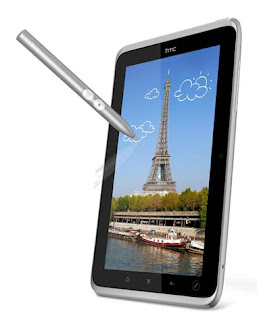
Something special and was most pronounced on the Flyer is the faradaic pen with Scribe technology introducing the HTC. Magic Pen comes with a stylus, a player can get rid of what is the impact of hand and what is the impact of the pen and without any mistake. Users can draw on the screen in any application that interfaces with the stylus on the touch screen, screen-capture Flyer will at that time then to write and record drawings. Pens can also use the application to mark the reading section, detailed reading of interest.

Meanwhile, the application note is used almost entirely for the pen, users can select various types of pens with different features to small and very rich colors. Further, this application allows to take pictures and add notes and then write the file, draw up. Ability to record video and audio recording are also integrated directly into a single file note, which is very useful if used in meetings or sessions to store the entire contents.

Camera

Flyer using 5-megapixel camera resolution is similar to the sample Desire S or Legend, but image quality is quite low, pictures may be fuzzy feeling does not clearly detail when shooting landscapes. Meanwhile, if closeup (macro), the detailed images clearly show again. Video recording of the machine is advertised as HD but the quality is quite bad.


You can find this tablet in Amazon: HTC Flyer 3G / WiFi HotSpot / GPS / 5MP / 7 Inch Tablet Device


Discount Digital Cameras:


Brought to you by Beso.com

Wednesday, 11 May 2011

Acer Iconia Tab A500 Review - Best lablet with good features

Acer Iconia Tab A500 Review -  Best lablet with good features
 Design is not impressive, but Iconia Tab A500 owned specialized operating system for Tablet PCs, the ability to execute well.

Since starting Motorola tablet with the Android 3.0 Honeycomb , the device using this platform are constantly appearing. Tab Iconia A500 is Acer's flagship product on the market tablet, tablet form with 10-inch screen, design, and certainly better value than competitors.

Here are the points of attention Acer Iconia Tab A500 .

  • 10.1-inch screen with resolution of 800 x 1280 pixels, 256 thousand color
  • Size 260 x 177 x 13.3 mm and weighs 730 grams
  • Wi-Fi n standard, Blueooth 2.1, GPS
  • Nvidia Tegra processor 1GHz Dual Core 2, 2 Tegra chipset, 1GB RAM, 16GB memory
  • Gingerbread Android 3.0
  • Camera: 5 megapixel rear support autofocus, LED flash, front camera is 2 megapixels

Design

If Apple took the iPad 2 as a standard, then Iconia Tab nearly two times thicker. In fact, this is the tablet form of structured sure, but not fashion lines.

Machine owned 10.1-inch screen, LED backlit technology, resolution 1280 x 800 pixels. This is a size sufficient to interface experience hives on the new OS, with icons that allows users to edit the finger.

Iconia Tab with 5 Megapixel camera in the rear, integrated flash. Backside metal machine, very solid. Two speakers are arranged a little bit lower, this design can make people concerned about sound quality, but in reality, the machine for hours and not to interfere with the layout.
 Acer Iconia Tab A500 Review -  Best lablet with good features
Acer is also located in front of a camera, located slightly left corner of the screen. Users can make video calls or self-portrait.

On the edge of Iconia Tab, is the connection port and buttons. Increase the volume down button, screen rotation key located on the corner, the left is the power button, headphone jack, microphone HDMI port, while the right side is the charging port, USB and microUSB full. Gateway at the bottom of the dock layout.

Features

Iconia Tab not much difference in hardware or tablet form cuaso with Android on equipment. This model uses a dual-core processor Nvidia Tegra 2, 1GB RAM, Wi-Fi n standard, integrated HDMI port, Bluetooth 2.1 and rotate the sensor system.

Iconia Tab have GPS, digital compass in addition to a memory card slot allows expansion through microSD standard. Machine with up to 16GB of internal memory.

The equipment and hardware to turn the lock button makes the machine becomes more convenient to use.

Acer Iconia Tab A500 Review -  Best lablet with good features

That is the foundation for Google's tablet, Honeycomb really quite different, elegant interface than the tablet version to use Android 2x .

New users will need to take some time to familiarize. Android tablet no room for hardware such as smart keys, 4 control keys located in the lower left corner of the screen, context menus and messages for the right layout.

IOS on the tablet compared with Apple, the main difference is the information put out the Home screen. Accordingly, Google allows users to put icons, widgets out. In addition, the machine also allows for the quick e-mail, Twitter, Facebook, YouTube channels.

If the IOS or Android 2x is a type of smartphone use, the interface is almost Honeycomb combination of multi-tasking plus the layout of the application, go to the icon, notification of a PC.

Iconia Tab Honeycomb original interface, the new layout may cause some people take time getting used to, but it can be concluded Android 3.0 is a solid foundation for a computer table. From the Home screen customization, add widgets, pictures, manual web site the ability to smoothly transfer applications, giving personality to the user. However, this would be a double-edged sword, especially those who are familiar with the IOS or Simple Android 2.x.

Performance.
 Acer Iconia Tab A500 Review -  Best lablet with good features
The standard tests such as web surfing, gaming, watching movies, Iconia Tab almost no difference compared with LG Optimus Pad , Asus Transformer or Xoom by Motorola. Applications open on your computer quickly, the surf, watch movies almost nothing worth complaining.

However, with the carefully calculated, we can see the quality of Iconia Tab screen is not really nice, the visible pixels. Web surfing, reading good books, but while watching movies, pictures, colors on a bit pale.

Iconia Tab for time battery life of about 8 hours of continuous HD video and more than 10 hours surfing the web, using other features.


You can find this tablet in Amazon: Acer Iconia Tab A500-10S16u 10.1-Inch Tablet Computer (Aluminum Metallic)


Discount Digital Cameras:


Brought to you by Beso.com

Thursday, 3 March 2011

Select tablet or netbook?

Select tablet or netbook?
Tablet PCs are more portable, operating system, consistent with a touch screen and the small size while netbook can help entrepreneurs run applications from the Windows Professional.

One year appeared on the market could be not enough for many users to answer questions should use the netbook or tablet computer for their own needs. While in 2010 is considered to be the year of the netbook tablet have started slow in both sales and number of new models appeared recently.

The tablet form on the market as Apple iPad or Galaxy Tab certainly better than a netbook for mobility and battery life. However, a laptop computer running Windows has its own advantages.

Here are some comparative advantages of these two series for each purpose, the need to use the user easily select accordingly.

Why netbook better

Performance and applications
Select tablet or netbook?
There are many computer models now support tables Adobe Flash in its browser but mostly to see the content than the ability to interact with users. If you like games like Restaurant City or FarmVille on Facebook, a netbook will certainly serve better.

For those who use iPad to travel to places never previously set foot, so to the best of Apple tablet in the house and replace it with a mini laptop or netbook. Some airlines and hotels use flash web content, something that Apple devices can not be displayed.

Although IOS and the repositories Android are becoming larger, but the programs running on Windows has a long history of development options and provide large scale significantly better. One of the main software VPN (Virtual Private Network) encryption key for the operating system desktop. VPN is a requirement for companies to allow employees to access the personal database.

Feature set

Only a few samples of tablet PCs equipped with SD card reader (most use the microSD card replacement) and even very few models have USB ports. On the other hand, are most netbooks come with handy card reader, 2 to 3 USB ports and VGA output. Even, even if your USB tablet driver is compatible with external devices is not as Windows or Mac OS.

Virtual keyboard is always a long story when comparing between netbook and tablet. However, it is clear that a keyboard will be more convenient for people to write a email or a presentation. Furthermore, despite multiple tasks, but still only tablet that can display one application at a time while the netbook can simultaneously display multiple windows to track.

Storage capacity

Tablet use flash memory storage, faster and more secure than magnetic disk drives in netbook traditional. However, storage is the main problem of current tablet when most models are only the largest capacity is 64GB, while popular netbooks around 250GB hard drive. Except for about 20GB of space for Windows, users are still more than 200GB for storage.

Netbooks more attractive prices

Due to popularity, netbook is now available at attractive prices than ever before. Current price for a stable model used in Vietnam to around 6-7 million. Meanwhile, the first iPad also cost at least more than 10 million, to form stable cheap but not as high as Archos also has about $ 8 million.

Reason tablet dominance

Duration good battery life and the ability to immediately
Select tablet or netbook?

Like other smart phone models, computers rarely been off the table would only be put on standby status to save power. This makes the device status can return to work almost immediately. The tablet can send / receive email or text message for 24 hours a day. Battery life is also better than the netbook for about 10 hours of continuous use.

Costs for applications

Most IOS Android applications and are priced from just 1 USD to 20 USD is very easy for users to buy used. Meanwhile, the proprietary Windows programs can cost several hundred dollars for a professional.

Multi-touch screen

Some recent models such as the Lenovo IdeaPad S10- has equipped multi-touch screen. However, the look and functionality on the Windows operating system can not be compared with Android, IOS or Tablet BlackBerry OS on the ability to use touch screen and user interaction.

OS suitable for smaller screen netbook

Not only is the mobile platform created for touchscreen devices. The OS has been using a tablet interface, icon or software controls are consistent with the small screen to the user to easily manipulate and get acquainted.

You can read more 5 reasons to buy a computer table

Conclusion

If users travel frequently and regularly to check email, web browsing and social networking players, tablet PCs are great choices. On the other hand, netbooks may provide the convenience, more flexibility when transferring photos from camera to computer and business customers need VPN or professional programs.


Followers

Powered By Blogger